 Guessroo
Guessroo Stream mode lets your whole chat play a guessing game with you. Open the menu (☰), tap Stream mode, pick a game and paste the short link (guessroo.com/p/CODE) into your chat. Everyone who opens it plays the same 5 questions at their own pace, and a live leaderboard ranks the room by points, then time, with you against the chat average. It is free, needs no bot, extension or login, and holds up to 3,000 players.
On this page
Stream mode at a glance
Stream mode is a play-along version of Guessroo's five daily guessing games, built for Twitch, YouTube Live, Kick, TikTok Live and Discord streams, as well as classrooms, office calls and big family gatherings. The streamer (or host) opens a room, shares one link, and plays on screen while the audience plays on their own phones and computers.
| Stream mode | |
|---|---|
| Players | One streamer plus up to 3,000 players in the room |
| Questions | 5 per match, the same for everyone in the room |
| Pace | Everyone answers at their own speed; nobody waits for anyone |
| Points | Up to 100 per question, so up to 500 per match |
| Leaderboard | Live: by points, then questions answered, then time (fastest first) |
| Streamer vs chat | Your score against the average of everyone who finished, and how many viewers you beat |
| Next match | Only the streamer starts it, in the same game or another; the room follows |
| Names | Random animal names for everyone, such as Witty Numbat 70; no typed nicknames |
| Cost and setup | Free. No account, no bot, no browser extension, no download |
| Your stats | Stream matches never change anyone's streak, stats or the daily leaderboard |
What you need
- A browser on the device you stream from. Most streamers use a computer and capture the browser window or tab in OBS Studio or Streamlabs. A phone works too, for mobile streams.
- A chat. Twitch, YouTube, Kick, TikTok Live, Discord, a Zoom or Google Meet chat, or simply a TV screen in a living room where people read the link.
- Viewers with a phone or computer. They open the link in any browser. Nothing to install and no account.
How to start a Stream mode room, step by step
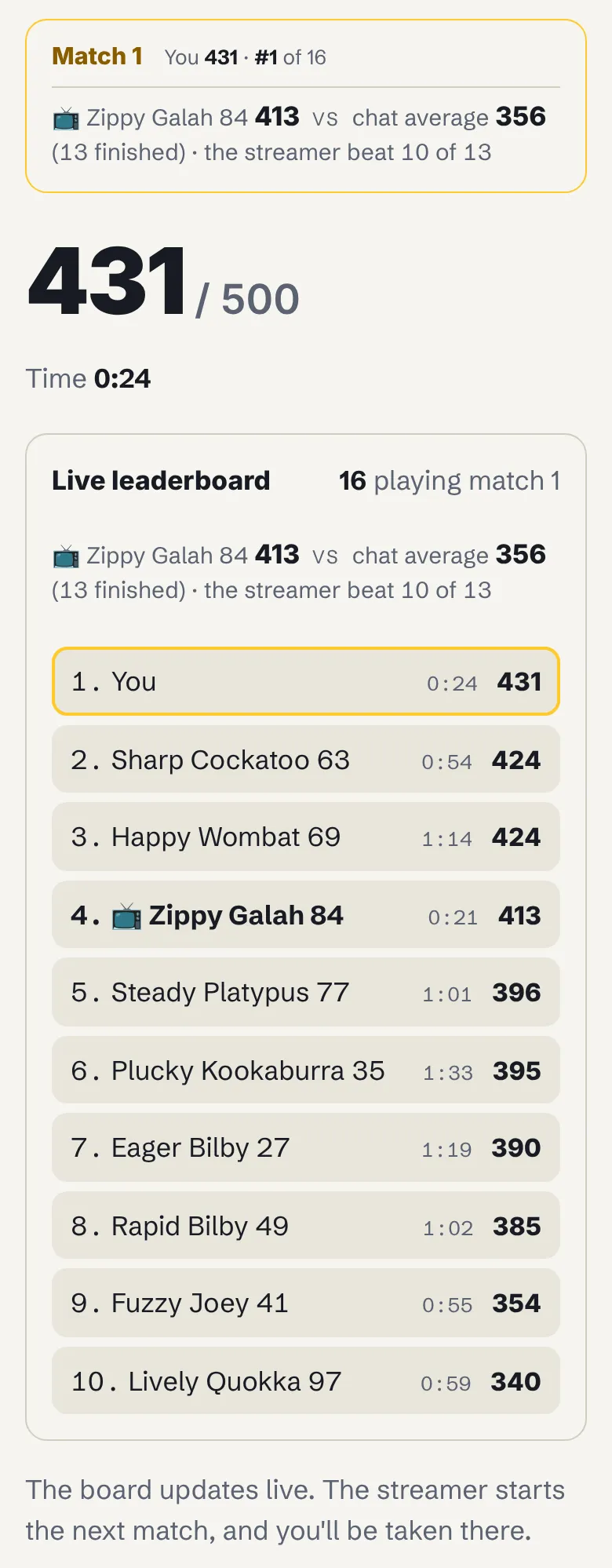
These screenshots come from a real room in Weighroo, the weight guessing game. The streamer, Zippy Galah 84, played on a laptop; one viewer, Witty Numbat 70, played on a phone; 14 more players filled the board.
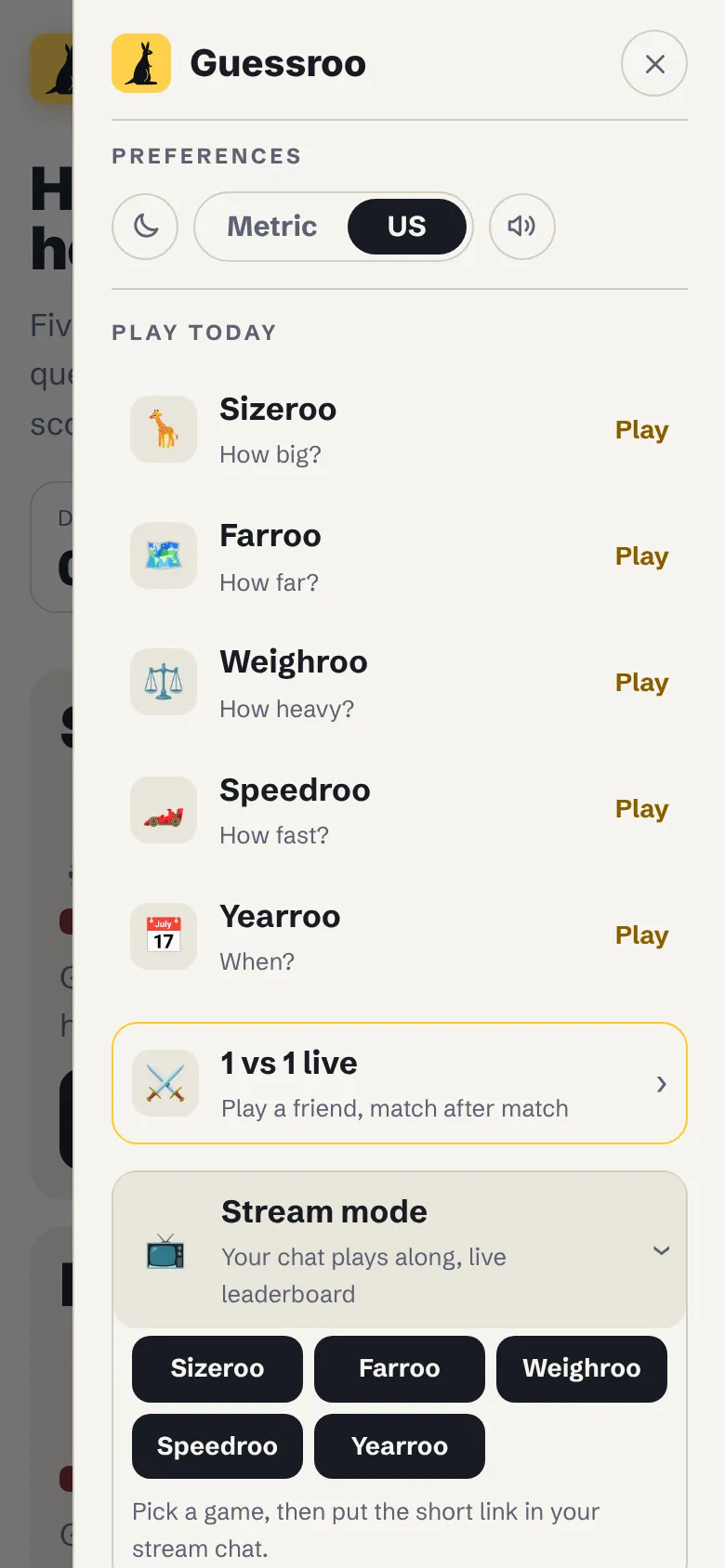
Step 1: Open the menu and choose Stream mode
On guessroo.com or in any game, tap the menu button (☰) at the top right, then Stream mode. Pick the game for your first match: Sizeroo, Farroo, Weighroo, Speedroo or Yearroo.
Step 2: Put the short link in your chat
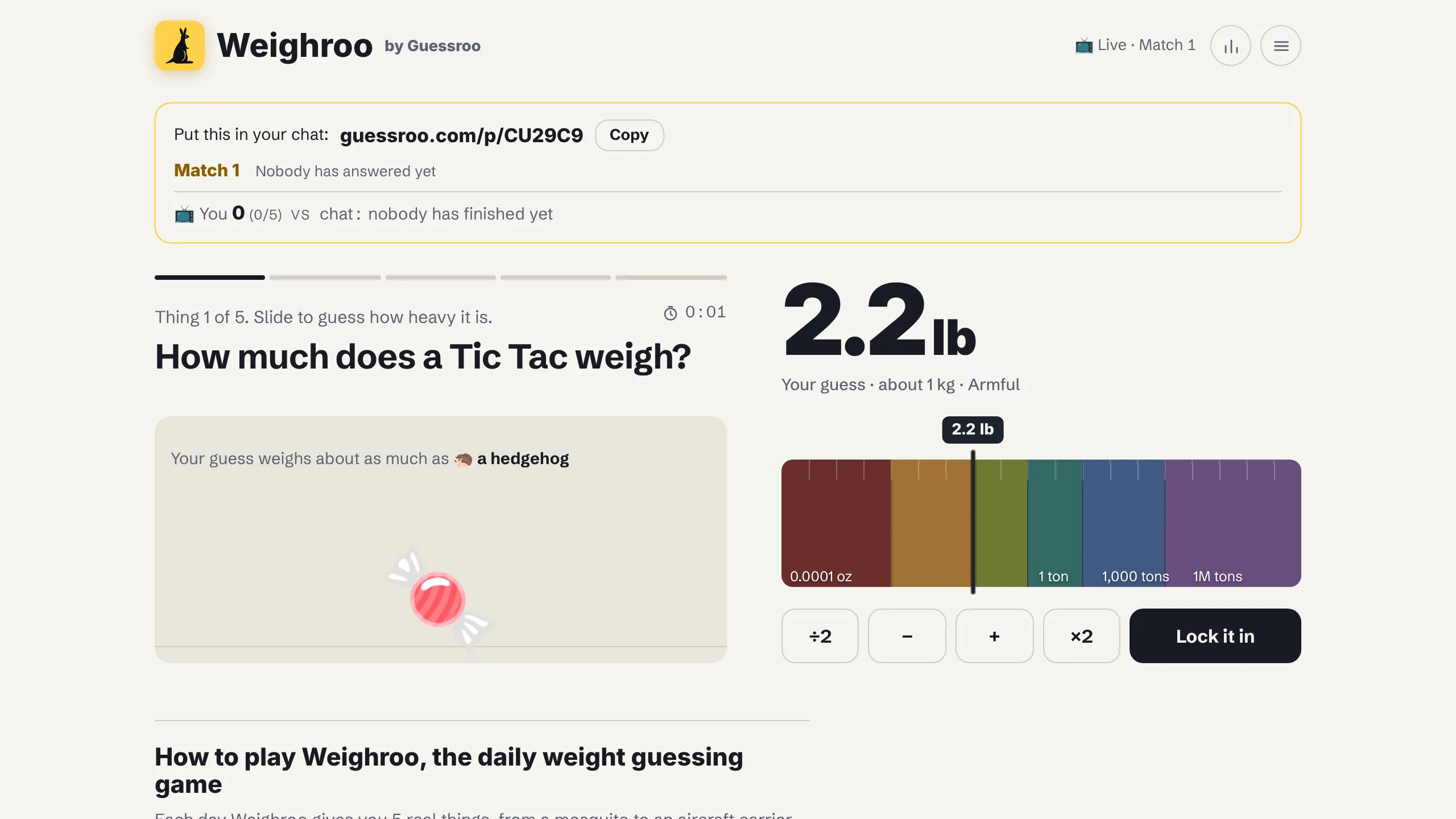
Your room opens with a box at the top: Put this in your chat: guessroo.com/p/CODE, with a Copy button. Paste it in chat and, if you can, pin it or add it to a chat command so latecomers find it. The link shows a preview that invites people to play live with your stream.
Step 3: Viewers open the link and play along
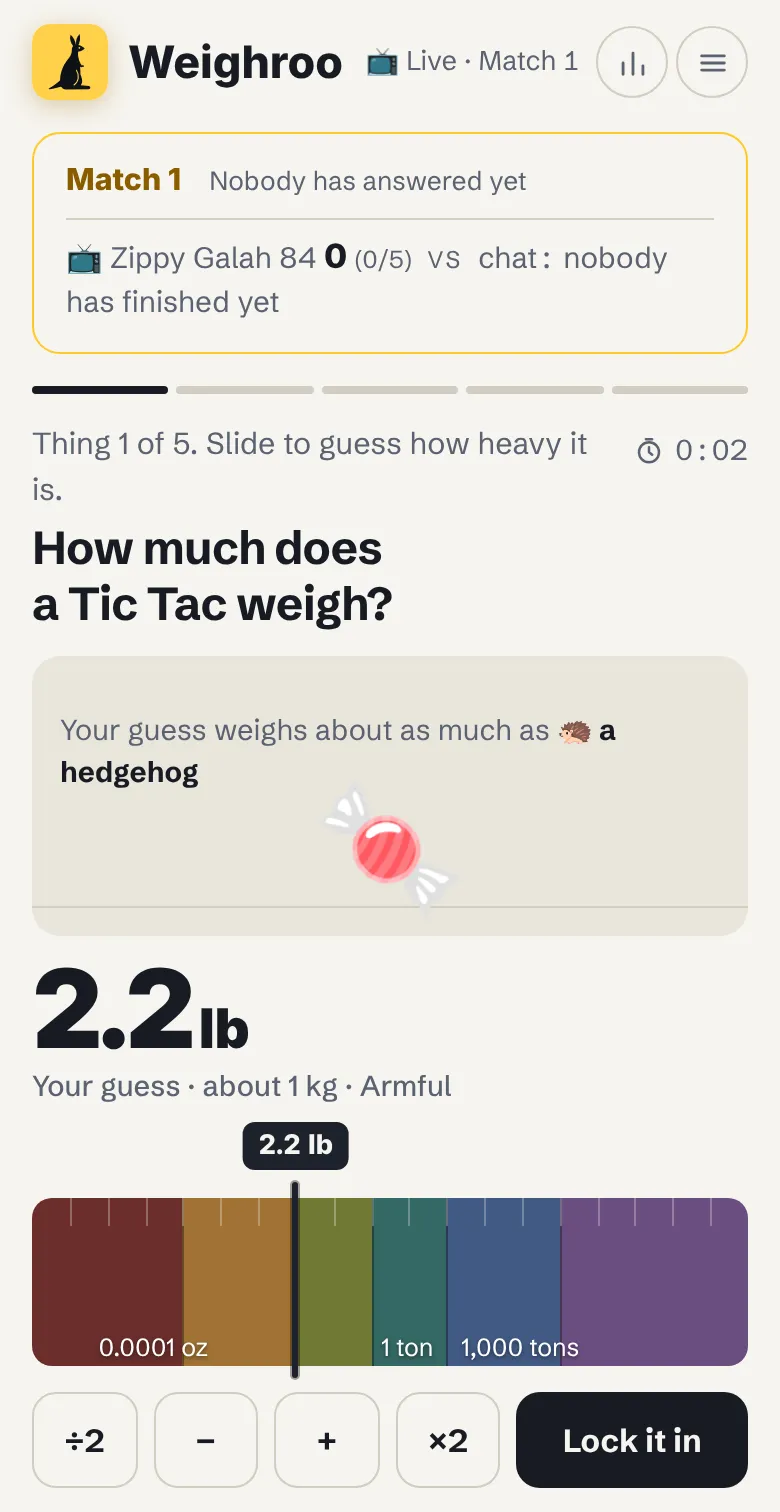
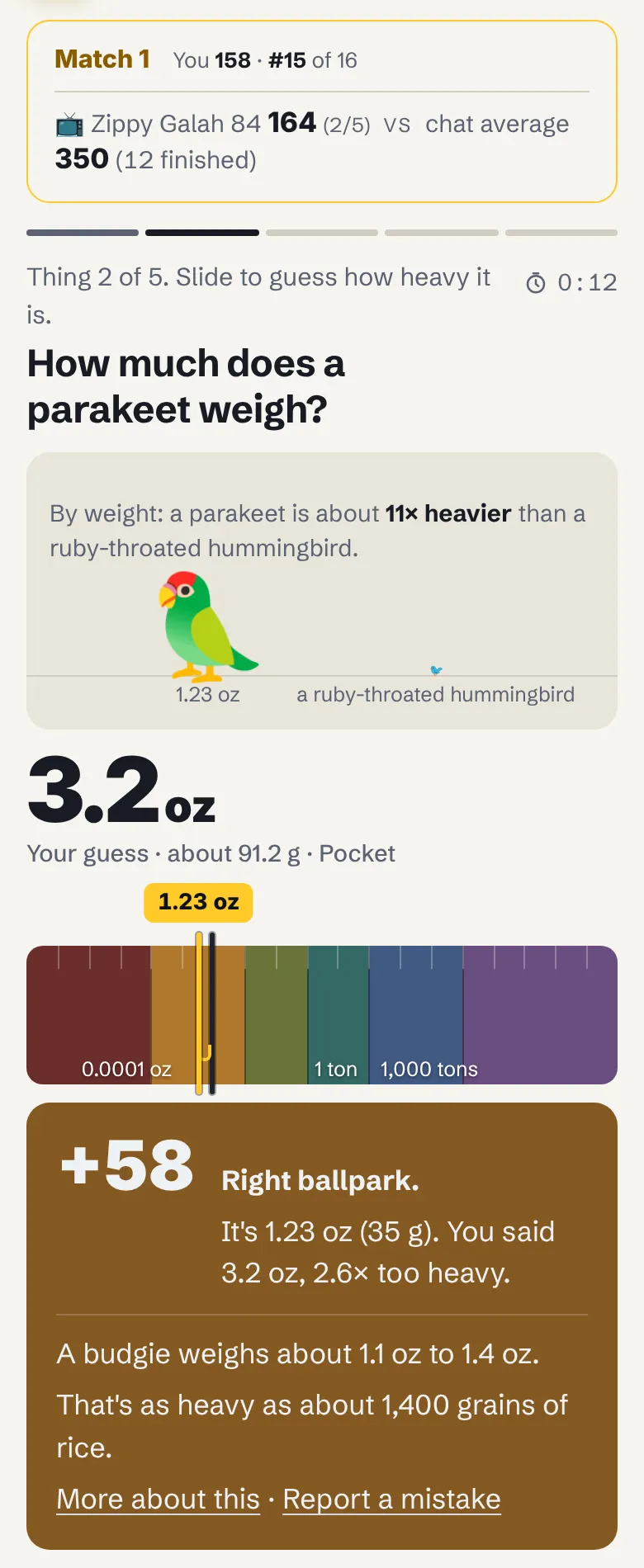
Everyone who opens the link lands in your room on the current match. Their bar shows the match number, their own score and place (for example "You 158 · #15 of 16") and the streamer against the chat. Each viewer answers at their own pace: there is no waiting for the slowest player, which keeps a big chat moving.
Step 4: Play on screen while the board fills up
Play your 5 questions on stream like a normal game, and talk your guesses through: chat loves to argue about whether a whale shark weighs 2 tons or 20. Your screen refreshes about every 4 seconds and your viewers' every 8 seconds, so the board stays close to live without anyone pressing anything.
Step 5: Show the live leaderboard
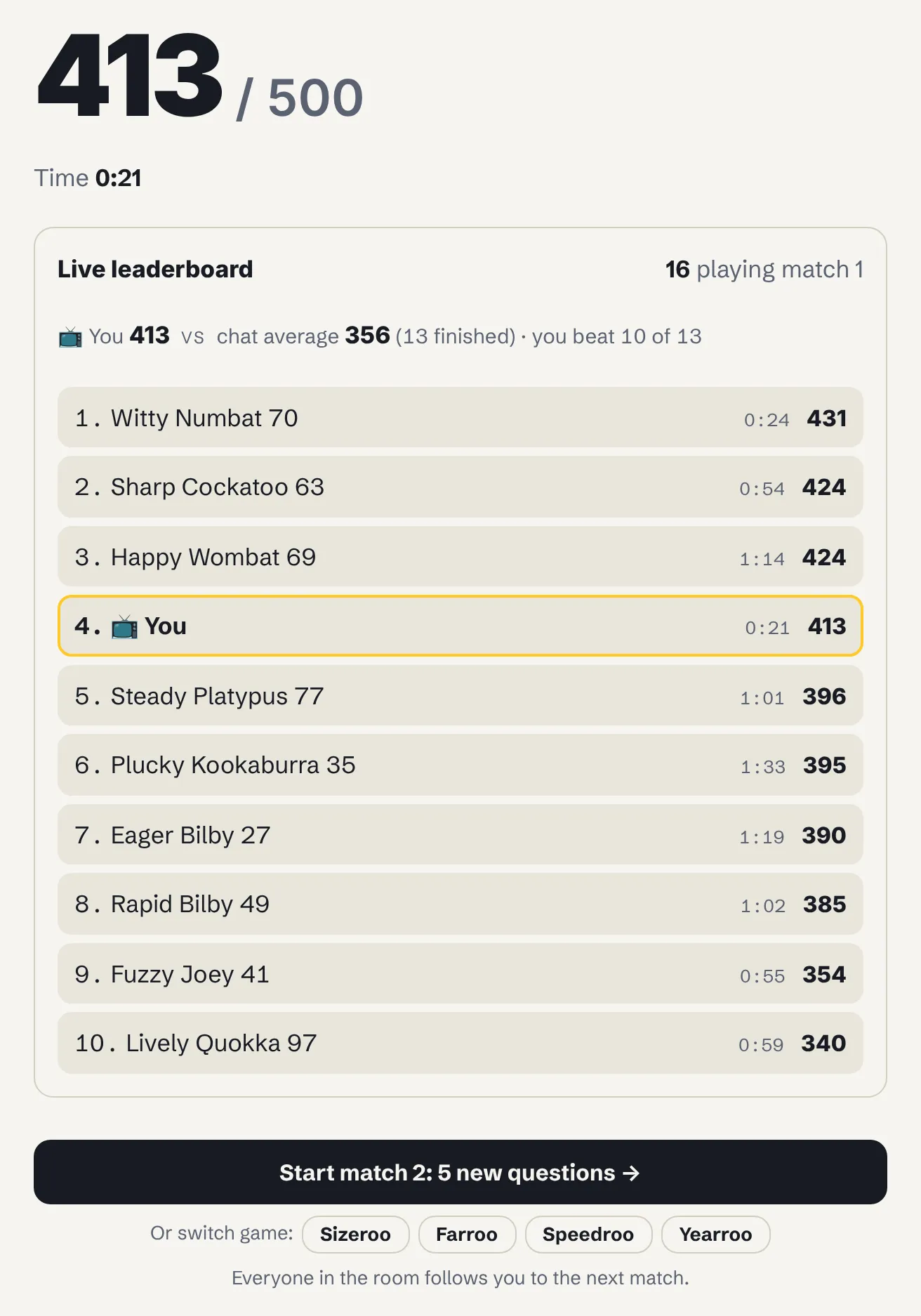
When you finish, the Live leaderboard shows how many people are playing, your score against the chat's average, how many viewers you beat, and the top 10 with each finished player's time. Your own row is outlined and marked 📺. Viewers who finish see the same board, with their own row highlighted.
Step 6: Start the next match
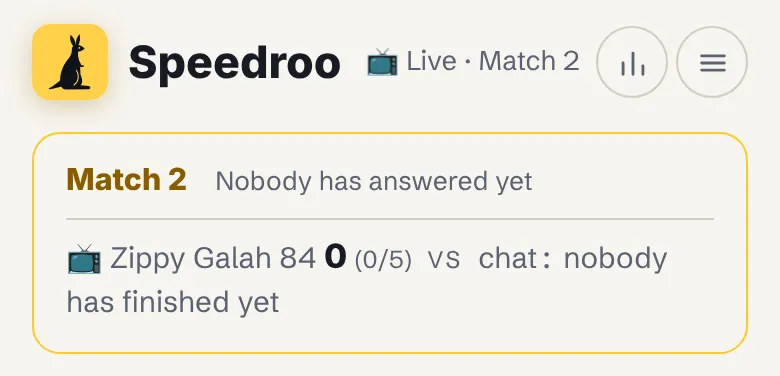
Only the streamer can start the next match. Tap Start match 2: 5 new questions, or pick another game under Or switch game. Everyone who has finished is moved to the new match automatically. Anyone still answering gets a note, "The streamer started match 2", and can join right away or finish their match first.
The official rules
- One host, many players. The person who opens the room is the streamer. Up to 3,000 players can join the room with its link.
- Five questions per match. Everyone in the room gets the same 5 questions in the same order, picked at random for the room from the game's 600 questions.
- Own pace. Each player answers when they are ready. Nobody waits for anyone else.
- Up to 100 points per question. The closer the guess, the more points, with the same scoring as the daily games (see below). A perfect match is 500.
- The board ranks by points, then progress, then time. More points first; on equal points, the player who has answered more questions; then the faster total time over the questions answered. Players equal on all three share a place.
- Time is a tie-break only. Each question's clock runs from when it appears until the player locks in, capped at 10 minutes. Time never changes a score.
- Streamer vs chat. The chat average counts only viewers who finished all 5 questions. "You beat 10 of 13" counts the finished viewers who scored fewer points than the streamer.
- The streamer runs the room. Only the streamer starts the next match and chooses its game. Finished players follow automatically; players mid-match can finish first.
- Friendly play. Stream matches never count toward anyone's streak, statistics or the daily leaderboard.
- Rooms last two days. A room closes two days after the last answer, so you can reuse the link for a stream the next day.
- No typed names. Everyone gets a random animal name, so there is nothing to moderate.
How points work
Every question rewards how close you get. For sizes, weights and speeds, the score depends on how many times too big or too small the guess is, so a guess 3 times off loses about half the points, whatever the units.
| Game | 100 points | About half the points | 0 points |
|---|---|---|---|
| Weighroo: how heavy? | Within 10% | About 3 times off (52) | 10 times off |
| Sizeroo: how big? | Within 10% | About 3 times off (52) | 10 times off |
| Speedroo: how fast? | Within 10% | About 3 times off (52) | 10 times off |
| Farroo: how far? | Within 5% | Half or double (50) | 4 times off |
| Yearroo: what year? | Exact year or 1 year off | 26 years off (50) | 51 or more years off |
A sample stream: the streamer against 15 players
Here is match 1 from the screenshots: the streamer and the top viewer, question by question. Guesses are rounded; the points are what the game gave.
| Question | Answer | 📺 Zippy Galah 84 | Witty Numbat 70 |
|---|---|---|---|
| How much does a Tic Tac weigh? | 0.018 oz (0.5 g) | 0.021 oz: 90 | 0.018 oz: 100 |
| How much does a parakeet weigh? | 1.23 oz (35 g) | 0.67 oz: 74 | 3.2 oz: 58 |
| How much does a roadrunner weigh? | 10.6 oz (300 g) | 10.9 oz: 100 | 7 oz: 82 |
| How much does a Nintendo Switch weigh? | 14 oz (398 g) | 5.7 oz: 61 | 1.08 lb: 91 |
| How much does a whale shark weigh? | 20.9 tons (19 t) | 27.7 tons: 88 | 20.5 tons: 100 |
| Total | 413 in 0:21 | 431 in 0:24 |
The streamer was the fastest player in the room but finished 4th: speed only matters when points are level. That happened just above, where Sharp Cockatoo 63 and Happy Wombat 69 both scored 424. Sharp Cockatoo 63 took 0:54 and Happy Wombat 69 took 1:14, so Sharp Cockatoo 63 ranks 2nd.
| Board line | What it means in the sample |
|---|---|
| 16 playing match 1 | Everyone who answered at least one question: the streamer, 13 viewers who finished and 2 still playing |
| You 413 vs chat average 356 | The streamer's total against the average of the 13 viewers who answered all 5 questions |
| You beat 10 of 13 | 10 of those 13 finished viewers scored fewer than 413 |
| 2. Sharp Cockatoo 63, 0:54, 424 | Place, name, total time over 5 questions and points |
Who Stream mode is for
Twitch, YouTube, Kick and TikTok streamers
Stream mode is an easy interactive stream game: no bot to install, no extension for viewers, and it works on any platform with a chat. It suits Just Chatting segments, a warm-up before the main game, a break between rounds or an end-of-stream closer. Five questions take about a minute, so you can run 3 to 10 matches in a segment, and the "streamer vs chat" line gives you a running storyline: can chat beat you?
Discord servers and community nights
Share your screen in a voice channel, post the link in the text channel, and the whole server plays at once. Rotate games each match and keep score of who tops the board most often.
Classrooms
Teachers can run it on a projector or smartboard while students play on school Chromebooks, tablets or phones. Every question is an estimation exercise in orders of magnitude, there are no accounts or student emails to collect, and the animal names keep it anonymous. After each match, open an answer page to discuss the real number.
Family gatherings and holiday parties
At Thanksgiving, Christmas or a New Year's Eve party, put the room on the TV and let everyone play on their own phone, from grandkids to grandparents. It works as a family trivia game for big groups because nobody needs to know the exact answer, and a close guess from a 10-year-old can beat an adult.
Office parties and team meetings
On Zoom, Google Meet or Teams, share your screen and drop the link in the meeting chat. One or two matches make a five-minute icebreaker for a team meeting or a remote office party.
Bars, clubs and events
Run a number-guessing round at a trivia night or club meeting: the host plays on the big screen and the room plays along on their phones.
Only two of you?
For a head-to-head game with one friend, where you play each question together and see each other's answers live, use 1 vs 1 live instead.
Tips for streamers
- Make the link easy to find. Pin the
guessroo.com/p/link, add it to a chat command such as!play, and put it in an on-screen text box for viewers who watch on TV. - Capture the browser at a large size. On a laptop, the room box, the question and the slider fit side by side, which reads well on stream.
- Give chat a head start. Read the question out, then wait a few seconds before you lock in, so viewers who joined late can catch up on the same question.
- Leave the board up. After your fifth answer, keep the leaderboard on screen for 20 to 30 seconds while late finishers come in, then start the next match.
- Switch games. Rotate Weighroo, Sizeroo, Speedroo, Farroo and Yearroo so different viewers get their moment.
- Shout out the top three. The animal names are funny to read out, and players who make the top 10 tend to stay for the next match.
Problems and fixes
| What you see | What it means and what to do |
|---|---|
| “This stream room is full.” | The room has 3,000 players. Open a second room for the overflow. |
| “This stream room has closed or the link is wrong.” | Rooms close two days after the last answer, or the link was cut short. Open a new room from the menu (☰). |
| A viewer's board looks a few seconds behind | Viewers' screens refresh about every 8 seconds, and the room keeps the standings for a few seconds to stay fast for big chats. |
| A viewer is still answering when you start the next match | They see a note and can join the new match right away or finish theirs first. |
| The chat average says nobody has finished yet | It counts only viewers who answered all 5 questions. Wait a little longer before you start the next match. |
Stream mode and the other ways to play
| Mode | Players | Pace | Counts toward your stats |
|---|---|---|---|
| Daily game | Everyone, on their own | Your own | Yes, plus the daily leaderboard |
| 1 vs 1 live | 2 | Question by question, together | No |
| Stream mode | A streamer and up to 3,000 players | Everyone at their own pace | No |
Frequently asked questions
How do I play a game with my Twitch chat?
Open the menu (☰) on guessroo.com, tap Stream mode and pick a game, then paste the guessroo.com/p/ link into your chat. Viewers open it in their browser and play the same 5 questions while a live leaderboard shows you against the chat.
Do viewers need an account or an app?
No. Viewers open the link in any web browser on a phone, tablet or computer. There is no sign-up, download, bot or browser extension.
How many people can play in one stream room?
Up to 3,000 players per room. For a bigger audience, open a second room.
How is the leaderboard ranked?
By points first, then by how many questions a player has answered, then by total time, fastest first. Players equal on all three share a place.
What is the chat average?
The average score of the viewers who finished all 5 questions in the current match. The board also shows how many of those viewers the streamer beat.
Can viewers start the next match?
No. Only the streamer starts the next match and chooses its game. Viewers who have finished are moved to it automatically.
Does Stream mode work on YouTube, Kick, TikTok Live or Discord?
Yes. Stream mode only needs a link in a chat, so it works on any platform, and also on Zoom, Google Meet, Teams or a TV in a living room.
Can I use Stream mode in a classroom?
Yes. Show the room on a projector and let students play on their own devices. No accounts or emails are needed, and everyone gets an anonymous animal name.
Do stream matches count toward my streak?
No. Stream matches never change anyone's streak, statistics or the daily leaderboard.
Can viewers choose their own name?
No. Everyone gets a random animal name, such as Witty Numbat 70, so there are no usernames to moderate on stream.
Sources
The rules on this page are the rules the game uses as of November 2026. These pages say more about how Guessroo works.
- Guessroo FAQ: scoring, timer, 1 vs 1 and Stream mode
- About Guessroo: how the games work and how they are scored
- Guessroo privacy policy: what the game stores for rooms and leaderboards
Spotted a mistake? Tell us on the feedback page or at [email protected].